How to Make Your Azure Storage Accounts Bulletproof
During an Azure security assessment, I anonymously accessed approximately 1.4 million items in an Azure Storage Account containing almost 170 GB of exposed data, without using a single credential or leaving a trace in the customer’s data-plane logs. In this blog, I explain how this happened and provide a practical guide to making your own Storage Accounts bulletproof.
1 of the 20 Storage Accounts stood out
For Azure security assessments, I request Reader access across the agreed scope. It lets me enumerate resources and inspect their configuration without changing anything. Reader shows me how an Azure resource is configured, but it does not let me open the data inside it.
My custom tool, which I plan to release in the coming weeks, found 20 Storage Accounts spread across multiple subscriptions and flagged security issues on 17 of them. Most were still protected from the public internet by network restrictions.
Then 1 result stood out: it returned the containers belonging to the Storage Account and flagged them as possibly publicly accessible, which I honestly did not believe at first.
With the Storage Account and container name already in hand, I opened Azure Storage Explorer and tried to connect anonymously. I did not provide a data-plane role, storage key or SAS token.
The connection worked.
I immediately started analysing the container to understand what was inside and how much data had been exposed. The counter kept climbing and eventually passed 640,592 inspected items.
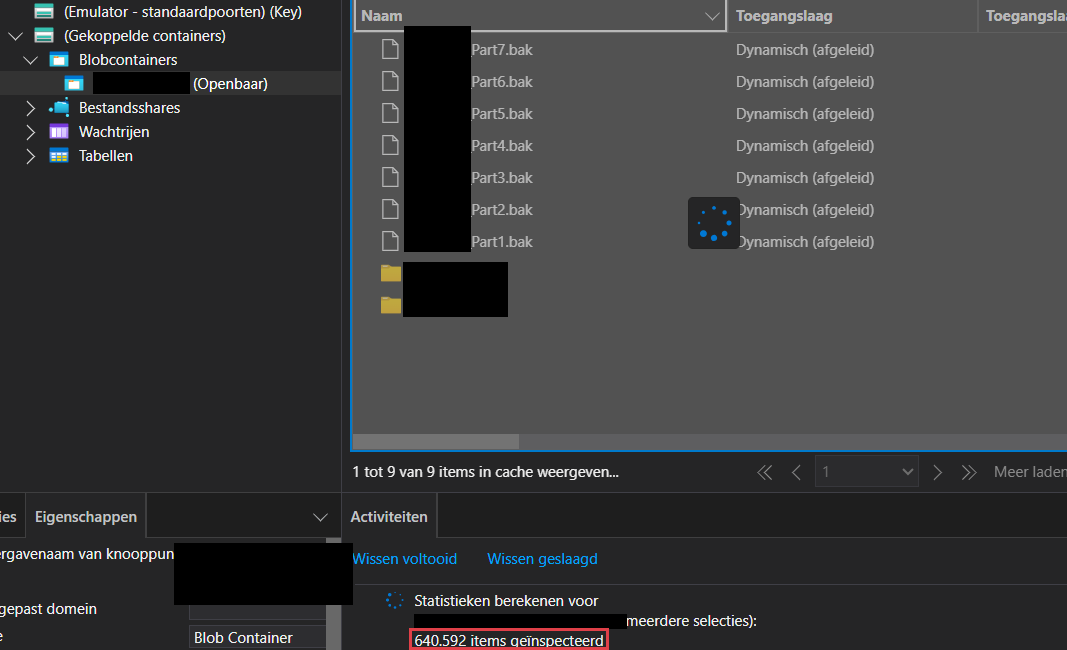
At 1,105,592 inspected items, with 70 GiB (approximately 75 GB) already identified, I stopped and called the customer.
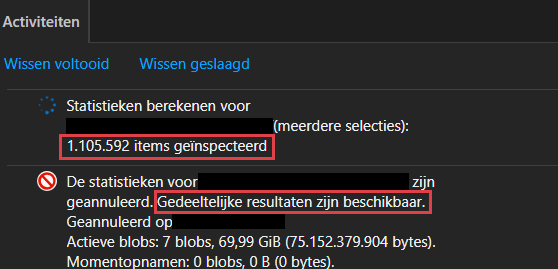
After informing them of the exposed container, I continued the analysis to determine its full scale. The analysis ended at 1,351,045 items representing 168.96 GB of data.
The container had a huge directory-like structure containing certificates, logs, SQL queries, application configuration, hardcoded credentials, customer and subsidiary data, and a lot of financial information. Browsing the structure and reviewing a small selection of files through Azure Storage Explorer was already enough to confirm how sensitive the exposed data was.
Think about it. No exploit, no authentication bypass and no stolen credentials. I simply connected to the Storage Account anonymously.
And the customer could not see any of it.
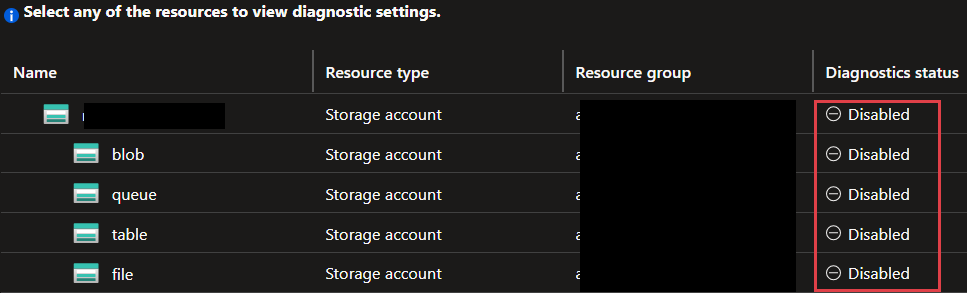
After I called the customer, they checked their monitoring but could not find any evidence of me listing the container or accessing its contents. The Blob data-plane logs that could have recorded my requests had never been enabled through a diagnostic setting. I was not surprised, as I repeatedly encounter Azure resources without diagnostic logging enabled during security assessments.
If those logs had been configured, the customer could have searched StorageBlobLogs for requests where AuthenticationType == "Anonymous". That could have revealed the requested URLs, timestamps and source IP addresses. Whether I was the only person who ever found and accessed the container will remain a mystery.
The customer remediated the Storage Account immediately. When I tested the anonymous connection again, the container was no longer accessible.
So, what exactly is an Azure Storage Account?
A Storage Account is where an application keeps its data in Azure. Instead of running and maintaining your own file server, you hand your files to a managed Azure service that stores, scales and serves them over the network. It is a common Azure resource and can provide several different storage services.
The service most people encounter is Blob Storage. It stores objects inside containers and is commonly used for uploads, application files, backups and logs. The same storage account can also provide Azure Files for SMB or NFS shares, Queue Storage for application messages and Table Storage for NoSQL data.
Each service has its own endpoint, but they are managed through the same storage account. Many security controls also apply at account level. Network rules, Shared Key authorization and TLS requirements can affect every service underneath it.
That is what makes Storage Accounts easy to underestimate. An application team may think it is using a single folder while years of data from several applications and processes accumulate in the storage account.
Configuration files, database exports, certificate files, deployment packages, backups and Terraform state often end up together. Access can reveal how applications are built, which systems they communicate with and where an attacker might go next.
Why did the anonymous connection work?
Public network access and anonymous data access are separate settings. For my anonymous connection to work, three conditions had to line up:
- The Blob endpoint had to be reachable from the internet.
- The Storage Account had to permit anonymous Blob access.
- The container itself had to be configured with a public access level.
All three were true.
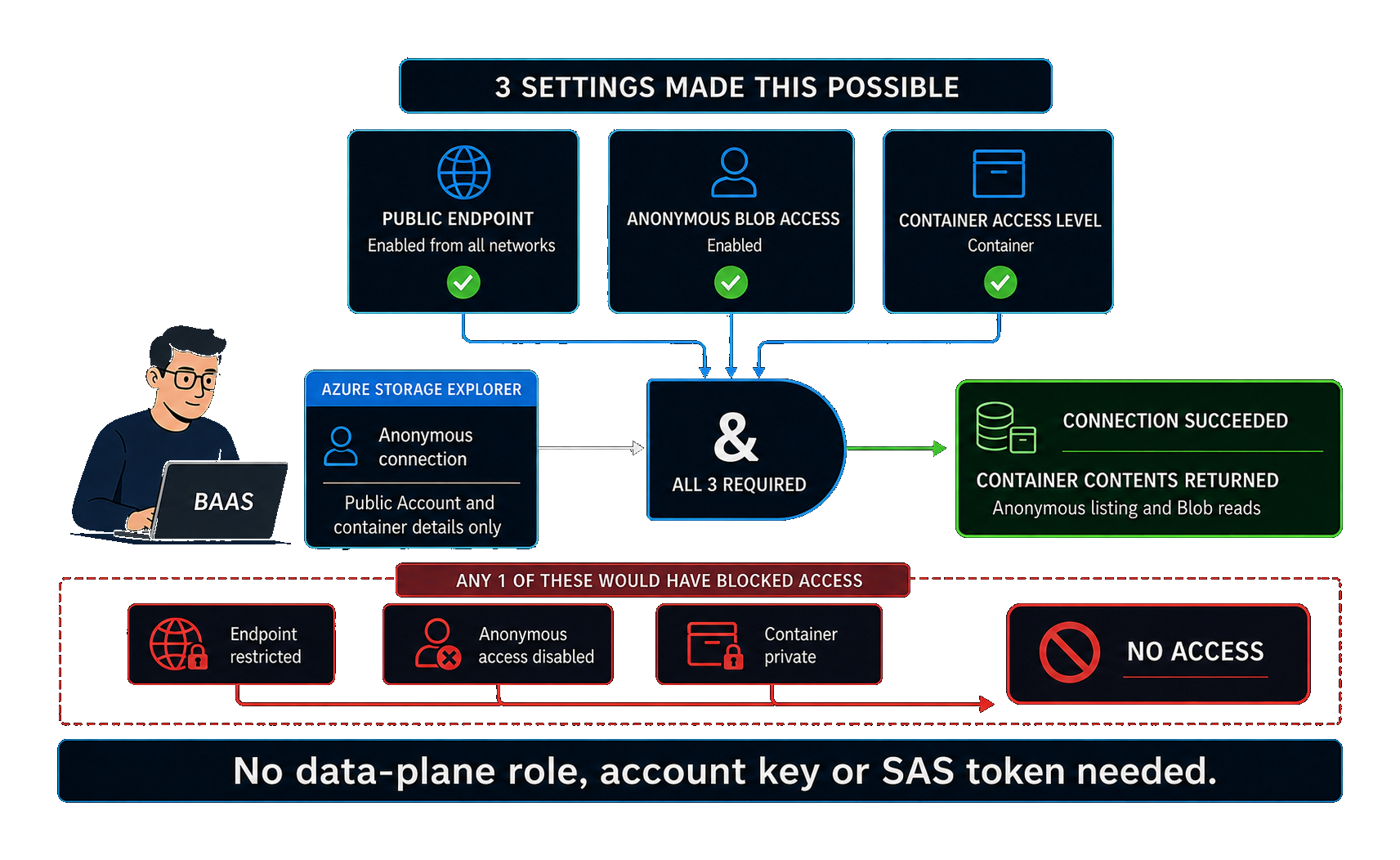
Think of allowBlobPublicAccess as the account-level master switch. Enabling it does not automatically expose every container. It only permits individual containers to allow anonymous access. Whether a container is actually public depends on its own access level.
In this case, the container was configured with the public Container access level. This allowed anonymous users to list the container and read the blobs inside it.
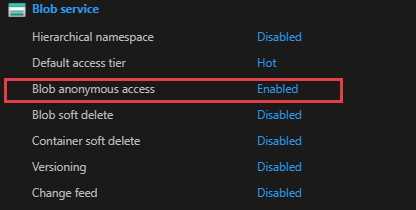
Several other Storage Accounts also permitted anonymous access at account level. Their network rules still blocked my connection. This storage account had none of those protections.
The Azure portal showed the configuration. Azure Storage Explorer proved the exposure by listing the contents of the known container without an identity, key or SAS token.
This is an important distinction in a security assessment. A public endpoint does not automatically mean the data is public, and the account-level setting alone does not prove it either. The proof was the anonymous connection that actually returned the data.
Why network restrictions would have stopped me
A restrictive storage firewall would have blocked my connection. A private endpoint would also have prevented my public connection, provided that public network access had been disabled or restricted separately.
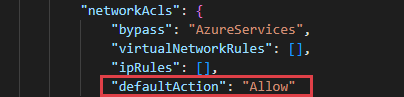
The affected storage account allowed public access from all networks and the firewall defaulted to Allow.

A private endpoint changes the network path. It does not replace authorization. A workload that can reach the private endpoint can still use a leaked key, SAS token or overprivileged Entra identity.
Network isolation decides who can reach the service. Identity and authorization decide what they can do once they get there. You will need both.
Shared Key is effectively a master key
Anonymous access was the path I used, but several of the other Storage Accounts had risky access paths too.
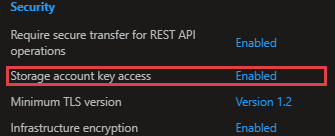
Shared Key is one of them. A Storage Account has 2 account keys, and either key can provide broad access across the storage account. The key has no built-in expiry and does not identify who is using it. Shared Key is still permitted by default on new Storage Accounts. Yes, that is somehow still the default..
The Storage Account also did not enforce a SAS expiration policy, so sufficiently privileged users could generate account SAS tokens with broad permissions. A SAS is a bearer credential, and whoever holds it can use it until it expires or is invalidated. Account SAS tokens are especially difficult to revoke individually because they are signed with an account key.
The SAS generation page allowed sufficiently privileged users to create a token covering all four storage services with read, write, delete and permanent delete permissions. A URL carrying that much power would provide extremely broad access to the Storage Account’s data.
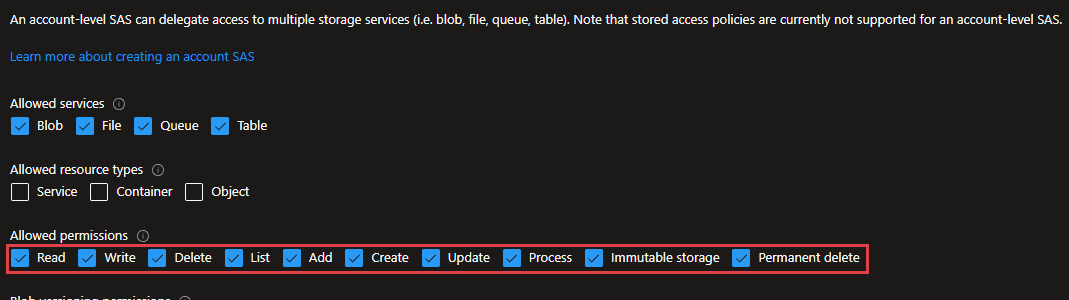
Shared Key was enabled across almost all the Storage Accounts, while enforced SAS expiration policies were consistently absent.
The better option is to give an application its own managed identity with a narrowly scoped data role, instead of a shared key. And when temporary Blob access is genuinely needed, a short-lived user delegation SAS backed by Entra is easier to control and provides better identity context than an account SAS.
What if someone had deleted the data?
The exposure was not limited to reading data. If a long-lived SAS with write and delete permissions had fallen into the wrong hands, the contents of the Storage Account could have been modified or permanently deleted.
Blob soft delete, container soft delete, versioning and change feed were all disabled. Without soft delete or versioning, deleted or overwritten blobs would have been much harder to recover. With change feed disabled, there was also no ordered record of changes to the Blob service.
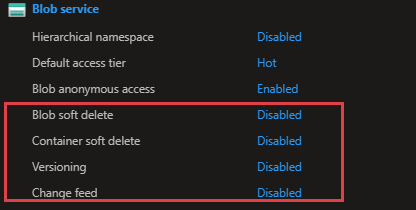
Soft delete keeps deleted data for a limited period. Versioning keeps older copies when a blob changes. Both help with mistakes, but neither is a complete ransomware or backup strategy.
A sufficiently privileged attacker may disable recovery settings, permanently delete data or remove the storage account. Geo-redundancy will also replicate a legitimate deletion to the other copy.
For critical data, I would add locked immutability and a vaulted backup outside the Storage Account. They cost more and need planning, but they can survive attacks that soft delete cannot.
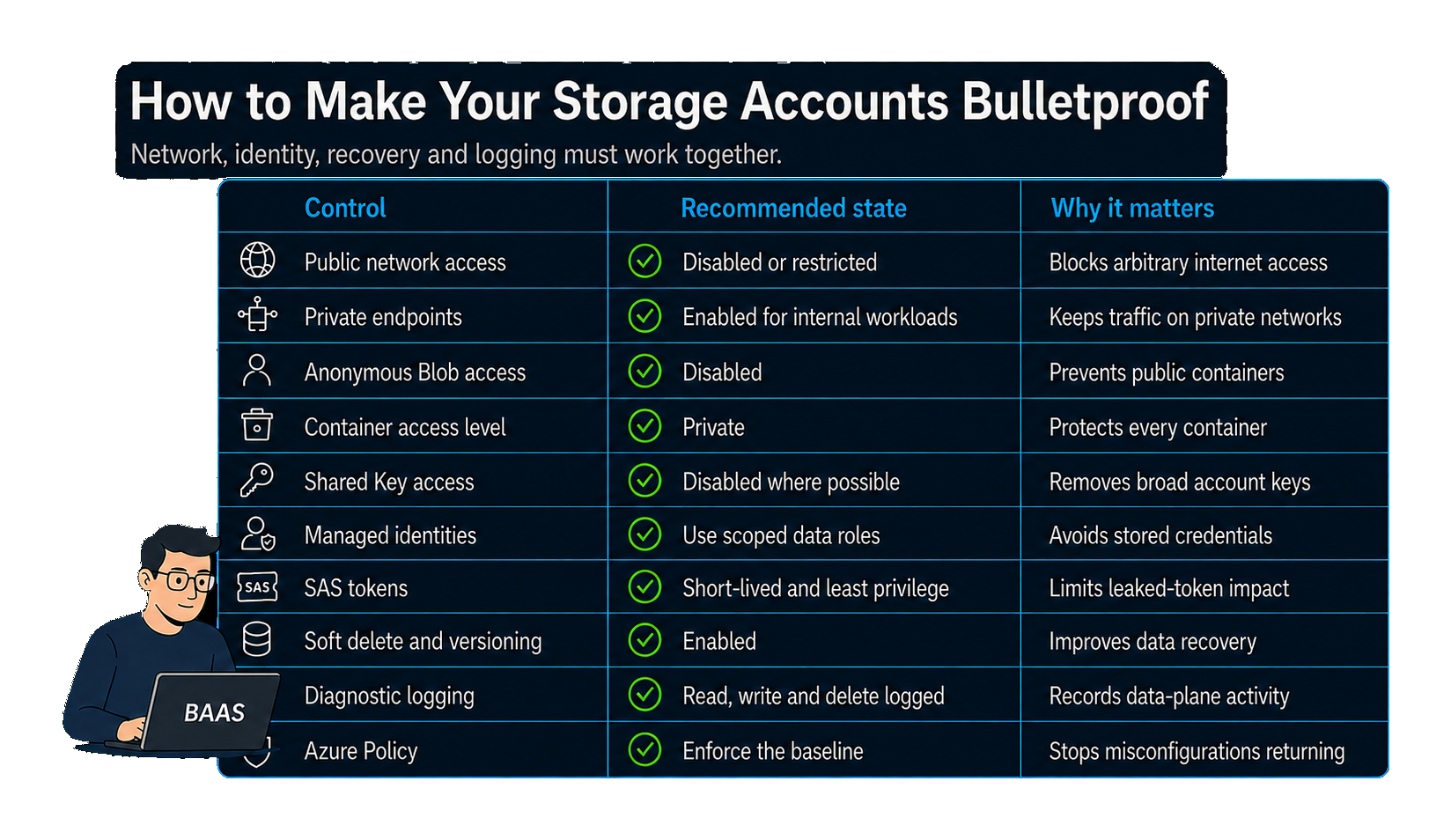
How to make your Storage Accounts bulletproof
If I had to harden Storage Accounts tomorrow, I would first map every Storage Account and identify which workloads, applications and administrative processes depend on it. I would also check whether they still rely on public access, Shared Key or SAS tokens. Disabling those access paths without understanding the dependencies is an easy way to break production.
Once that is clear, close the easiest path in. Restrict public network access, use private endpoints where possible, disable anonymous Blob access at account level and verify that every container is private.
Next, move applications away from account keys and onto managed identities with narrowly scoped data roles. Where a SAS is unavoidable, give it only the permissions it needs and keep its lifetime short.
Then review the high-impact management-plane permissions that can expose, weaken or disrupt Azure Storage. listkeys/action, listAccountSas/action and listServiceSas/action can return account keys or SAS tokens. roleAssignments/write can grant data-plane roles, while storageAccounts/write, containers/write and containers/setAcl/action can weaken security settings or make a container public. regeneratekey/action can invalidate keys used by applications, and storageAccounts/delete can remove the entire account.
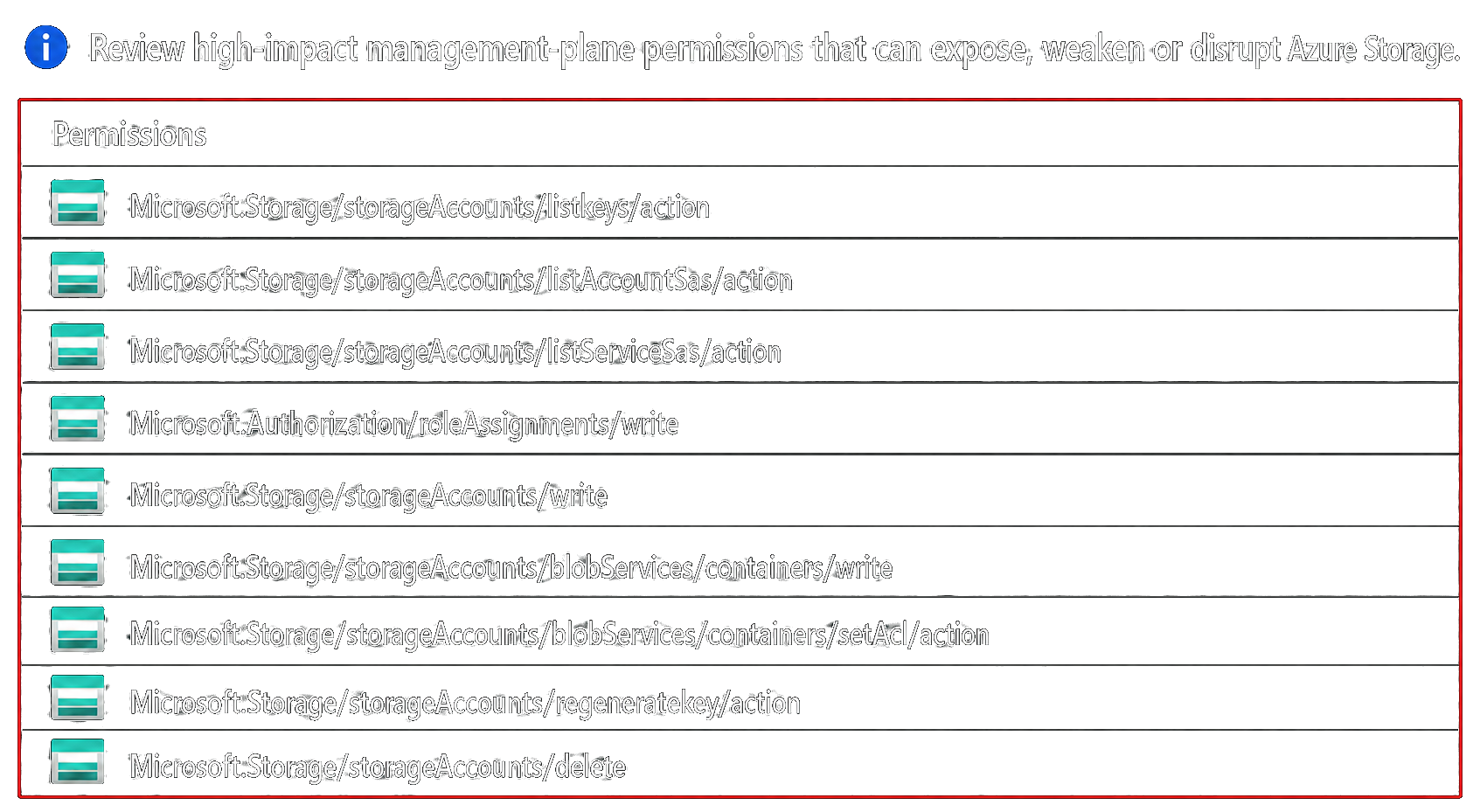
Then assume that preventive controls may eventually fail. Enable soft delete and versioning, protect critical data with immutability and keep a vaulted backup outside the Storage Account.
Enable data-plane logging, but decide beforehand where those logs should go and how long they need to be retained. On a busy Storage Account, every read, write, delete and list operation can produce a log entry. Sending everything to Log Analytics provides fast querying and alerting, but the ingestion and retention costs can become significant.
For critical Storage Accounts, I would keep the logs needed for detection in Log Analytics and archive them to a separate, protected Storage Account when longer retention is required. If anonymous access is a concern, StorageRead logging is essential, even though it may generate the highest volume.
And maybe the most important thing, enforce these security settings with Azure Policy. Manually fixing the existing Storage Accounts only solves today’s problems. Azure Policy can audit or block new Storage Accounts that do not meet the baseline, preventing the same misconfigurations from being introduced ever again..
The Storage Account in this story was not exposed through an advanced exploit. The endpoint was publicly reachable, anonymous Blob access was permitted and the container itself was public. Changing any one of those settings would have stopped my connection.
The absence of data-plane logging meant the customer could fix the exposure, but could not determine who had accessed the container before then.
Most exposed Storage Accounts do not look unusual. The difference often comes down to a few settings that were never properly configured or enforced. It is worth checking yours before someone else does.